
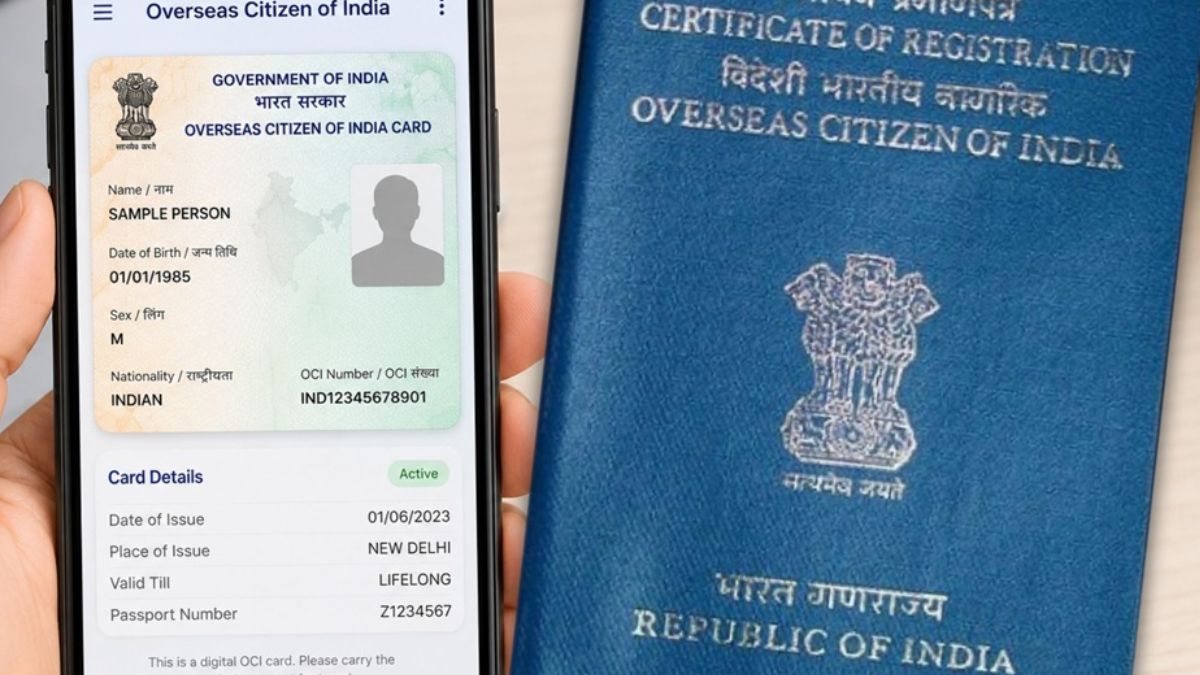
The Government of India has launched the Electronic Overseas Citizen of India (e-OCI) Card, it will allow eligible OCI cardholders to carry a secure digital version of their OCI card on their smartphones. This new e-OCI facility eliminates the need to carry the physical OCI booklet during travel and ensuring seamless access to the immigration and airline verification. Although the traditional OCI booklet remains as fully valid and digital version offers greater convenience for the millions of Overseas Citizens of India (OCI) living around the world.
What Is the e-OCI Card?
The Electronic Overseas Citizen of India Card or e-OCI Card, is like a copy of the Overseas Citizen of India Card. Existing OCI cardholders can get this eOCI Card from the official Overseas Citizen of India Services Portal.
When it download, it can store the eOCI Card on our phone and show it when we need to prove our Overseas Citizen of India status when we travel to other countries.
This is a thing because it makes it easier for us to carry our travel documents, does not have to carry the Overseas Citizen of India booklet with us all the time.
The government says that the e-OCI Card is an extra convenience for us. It does not mean there is no need the Overseas Citizen of India booklet anymore. The physical booklet is still valid.
Why Has India Introduced the e-OCI Facility?
India started the eOCI Card because they want to make it easier for people like us the Indian diaspora to get the services we need.
There are Overseas Citizen of India Card holders who travel to India often. As the OCI cardholders go to India for work to visit our family to study, to have fun or to invest in businesses.
To carry our travel documents on our phone it is easier for us.
This is also part of Indias plan to make all citizen services digital. They want to make it easier for Overseas Citizens of India to travel.
How to Download the eOCI Card
If we already have an Overseas Citizen of India Card we can get our digital Overseas Citizen of India Card online. We can do this through the Overseas Citizen of India Services Portal.
Here is what we need to do,
Step 1: Go to the Overseas Citizen of India Services Portal.
Step 2: Log in with our Overseas Citizen of India account.
Step 3: If we do not have an account we can create one using the email address we used for our Overseas Citizen of India application. \Step 4: Open the eOCI section, on our dashboard.
Step 5: Our Overseas Citizen of India application details will appear.
Step 6: Click on the button that says Generate eOCI Card.
Step 7: Download the Overseas Citizen of India Card and save it on our phone.
When we download the eOCI Card it is ready to use. We can show it whenever we need to prove our Overseas Citizen of India status.
Can the e-OCI Card Be Used at Airports and Immigration?
Yes. According to the government’s announcement, the downloaded e-OCI card can be presented to the,
- Immigration authorities
- Airline staff
- Other officials requiring proof of the OCI status during travel
This will allows traveler to access their OCI document directly from their mobile device instead of carrying the physical booklet on every trip.
However, travellers have to ensure that the digital card remains easily accessible on their smartphone throughout their journey.
By the way physical OCI Card is still valid and it will not affect the validity of the existing physical OCI booklet.
The government has also clarified that,
- Physical OCI cards remain as fully valid.
- Carrying the physical booklet is still permitted.
- This e-OCI card has been introduced purely as an optional digital convenience.
Users can choose whichever format the best suits their travel needs.
Benefits of the New e-OCI Card
The digital OCI card offers several practical advantages for the overseas Indians.
1. Travel Convenience
2. Instant Access
3. Reduced Risk of Loss
4. Faster Verification
5. Easier for Families
Who Can Use the e-OCI Facility?
The e-OCI service is available to the existing OCI cardholders.
To generate the digital card, users need to have,
- A valid OCI card.
- Access to the official OCI Services Portal.
- Login credentials linked to their OCI application.





 PM-VBRY Scheme: EPFO Offers Up to ₹15,...
 Global Hunger Index 2026: India Ranks 10...
 Sudhakar Dalela Appointed as India’s N...